

Version an agent
Agents change — you tune the prompt, swap the model, add a tool. Versioning lets you freeze a known-good state, so a running process keeps the behaviour it was built against even as you keep editing.
Publish a version
Section titled “Publish a version”-
Open the agent’s versions. From Agents, open the agent and switch to the Versions tab.
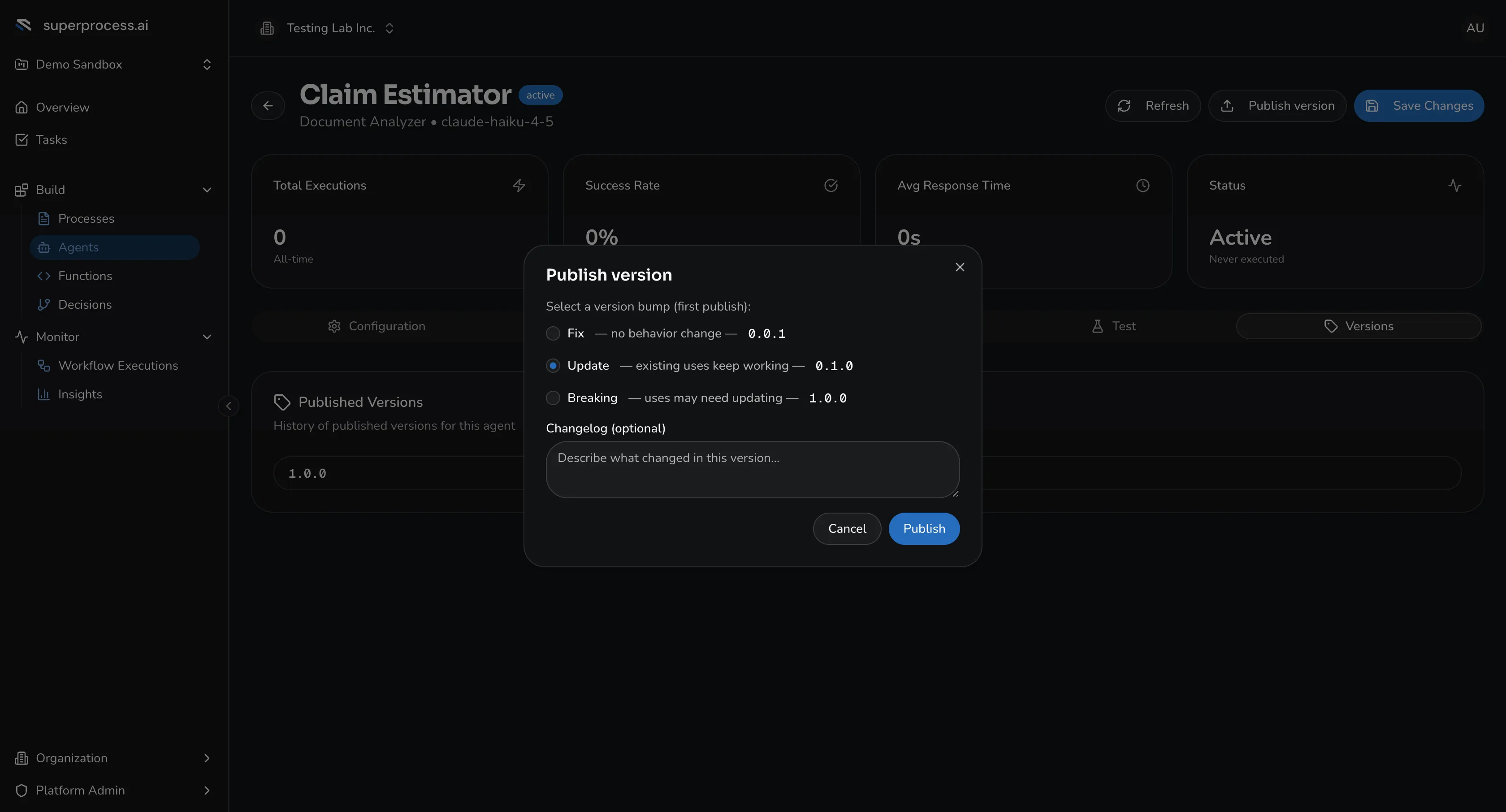
Publishing a version — pick Fix, Update, or Breaking, and optionally add a changelog. -
Publish. Click Publish version. Choose a version bump — Fix (no behaviour change), Update (existing uses keep working), or Breaking (uses may need updating) — and optionally add a changelog note.
-
Confirm. The new version becomes the current published version; earlier versions stay available and can be marked deprecated.
Pin a version to a process step
Section titled “Pin a version to a process step”When you attach an agent to a service task (the Select Agent step of the dialog), pick a specific published version to pin. That process will always run that version’s prompt, model, and tools — even if you edit the agent afterward. Leave it unpinned to always track the latest published version.
Roll back
Section titled “Roll back”Open the Versions tab, find an earlier version, and make it the current one — or re-pin the service task to it. Because published versions are immutable snapshots, rolling back is just re-selecting one; nothing is lost.