

Give an agent tools
By default an agent only reasons over the input you hand it. Give it tools and it can reach out — look up a record, post to a system, call an API — deciding for itself when to use each one. Tools come from two places: connectors and MCP servers.
Before you start
Section titled “Before you start”- The agent exists (see Create an agent).
- The connectors and MCP servers you want to expose are already set up at Settings → Integrations (see Build an integration and Configure an MCP server).
-
Open the agent’s tools. From Agents, open the agent and switch to the Tools & Integrations tab.
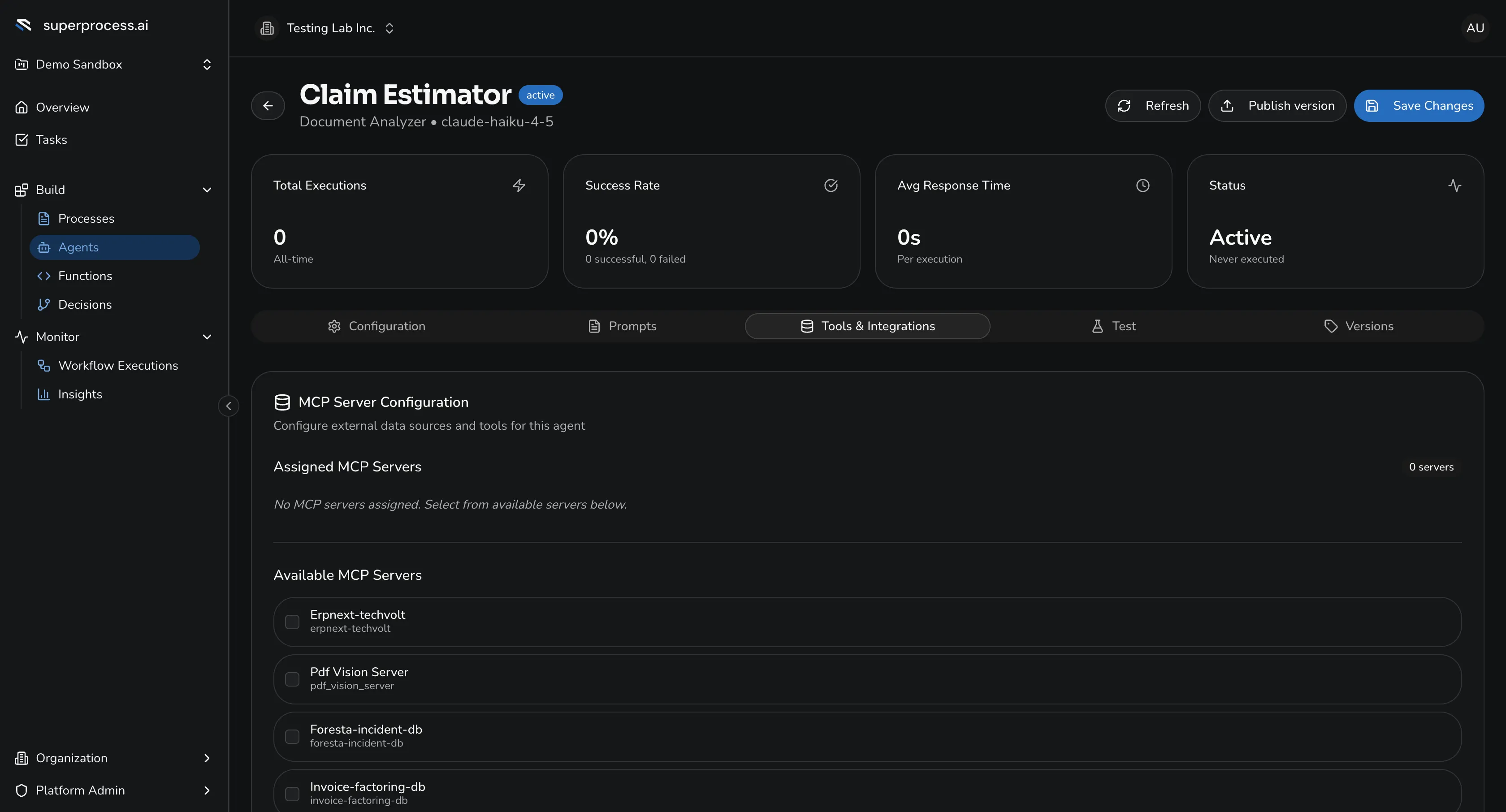
The Tools & Integrations tab — assign MCP servers and connectors, then Save Tool Configuration. -
Add connectors. Pick the connectors this agent may call. Each selected connector’s operations become callable tools in the agent’s roster.
-
Assign MCP servers. Move the servers you want from Available to Assigned. The agent can then call the tools those servers expose.
-
Save. Click Save Tool Configuration. The bound tools are now part of the agent.
How the agent uses tools
Section titled “How the agent uses tools”The agent decides, per run, which tools to call — reading the result, deciding, and calling another if it needs to. It chooses based on its system prompt, instructions, and the task input. Keep the tool set focused: every extra tool is another thing the model has to reason about, and every call adds latency.